
Microsoft Copilot for M365 has been generally available for two years now — and only 1.81% of Microsoft 365 subscribers have actually bought it. That number tells you something no vendor-funded ROI study ever will. So let’s talk honestly about what Copilot does well, where it falls short, and how to figure out if it belongs in your organisation.
In this post
- 1️⃣ What does Microsoft Copilot for M365 actually do?
- 2️⃣ Copilot vs ChatGPT — which one should your org use?
- 3️⃣ Why you can’t deploy Copilot without fixing data governance first
- 4️⃣ What does Copilot for M365 cost, and what do the adoption numbers really say?
- 5️⃣ Who actually gets ROI from Copilot — and who doesn’t?
- Is it worth it for your org?
- FAQ
- Further reading
1️⃣ What does Microsoft Copilot for M365 actually do?
Let me cut through the marketing. Copilot is an AI assistant embedded directly into your M365 apps — Outlook, Teams, Word, Excel, PowerPoint — with access to your organisation’s data via the Microsoft Graph. It can read your emails, your calendar, your SharePoint documents, and your Teams conversations. Then it uses that context to help you draft, summarise, and analyse.
Here’s what it’s actually good at, app by app:
Outlook — the killer feature
Honestly, Outlook is where most users get their money’s worth. Describe what you want to say in a few words, and Copilot drafts a well-structured email. It handles tone adjustments, thread summarisation, and multilingual replies without fuss. If you spend two or more hours a day in email, this alone can justify the license cost.
Teams — meeting summaries (with a big caveat)
After a recorded meeting, Copilot generates bullet-point summaries with decisions, action items, and owners. You can query the transcript directly — “what was decided about the Q3 budget?” — and get a direct answer. If you’re in back-to-back meetings all day, this is the feature you’ll actually use. The caveat: it only works for recorded meetings. If your organisation doesn’t routinely record, this feature doesn’t exist for you.
Word — solid document summarisation
Feed it a 40-page contract or a long report, and Copilot will summarise it well. “Summarise and flag red flags” prompts work better than you’d expect. It won’t replace a lawyer’s eye, but it’s a solid first pass that saves real time.
Excel — good on clean data, frustrating on messy data
Natural language queries over structured data work well — “total sales by region”, “highlight rows where margin is below 20%”. But the moment your spreadsheet has merged cells, inconsistent headers, or mixed data types, it falls apart. Excel Copilot rewards good data hygiene and punishes bad habits.
PowerPoint — useful for first drafts, nothing more
It generates presentation outlines from prompts or existing documents. The output needs heavy editing, but as a starting point it beats staring at a blank slide. Don’t expect finished decks.
The pattern is clear: Copilot accelerates skilled workers. It doesn’t substitute for them. It’s a productivity multiplier for people who already know what they’re doing — not a magic button that makes anyone an expert.

2️⃣ Copilot vs ChatGPT — which one should your org use?
This is the question I get most often from clients, and the answer is more nuanced than Microsoft would like.
Where Copilot wins
- Tenant data integration — Copilot has Graph API access to your emails, calendar, SharePoint, and Teams transcripts. ChatGPT requires manual file uploads every time.
- Data stays in your tenant — Prompts and responses are stored under existing M365 compliance and contractual protections. Microsoft doesn’t train on your org data.
- Sensitivity label awareness — Purview DLP policies can restrict Copilot from surfacing content with specific sensitivity labels. ChatGPT has no concept of your classification scheme.
- Audit trail — Copilot interactions are discoverable via Purview Audit, supporting eDiscovery and compliance requirements.
- Centralised admin control — Integrated into Entra ID with conditional access, full admin visibility, and policy enforcement.
Where ChatGPT wins
- Creative output quality — I’ll be blunt: ChatGPT produces better prose on open-ended tasks. More creative, more nuanced, less corporate. I use both, and ChatGPT is my default for anything that needs actual writing.
- Cost — ChatGPT Pro at $20/month per user often outperforms Copilot on general-purpose tasks. ChatGPT Enterprise is competitive on per-seat pricing with additional security features.
- It’s paradoxically safer if you haven’t done data governance — This is the point most people miss.
The counterintuitive security gotcha
This one surprises people: if your organisation hasn’t sorted out SharePoint permissions and sensitivity labels, ChatGPT is actually the safer option. ChatGPT doesn’t automatically index your SharePoint content. It can only work with what you manually upload. Copilot, on the other hand, has deep access to everything in your tenant — and it respects existing permissions, which means if your permissions are a mess, Copilot becomes an oversharing amplifier.
I’ve seen organisations where a junior employee could ask Copilot about salary benchmarks and get results from an HR SharePoint site they technically had read access to but never knew existed. That’s not a Copilot bug — it’s a permissions hygiene problem that Copilot made visible. You can also check out this guide for the new DSPM if you want to look into more oversharing.
Stop oversharing before you deploy Copilot: a Purview DSPM quickstart – NiST-Solutions
“It’s Microsoft, so it must be safe” is not a security posture. A lot of organisations trust that implicitly, and that assumption is exactly what leads to unpleasant surprises.
One of the things we can do to limit the data, copilot can access is by creating a DLP policy
Go to Purview -> Data loss Prevention -> Create Policy – Custom Policy.
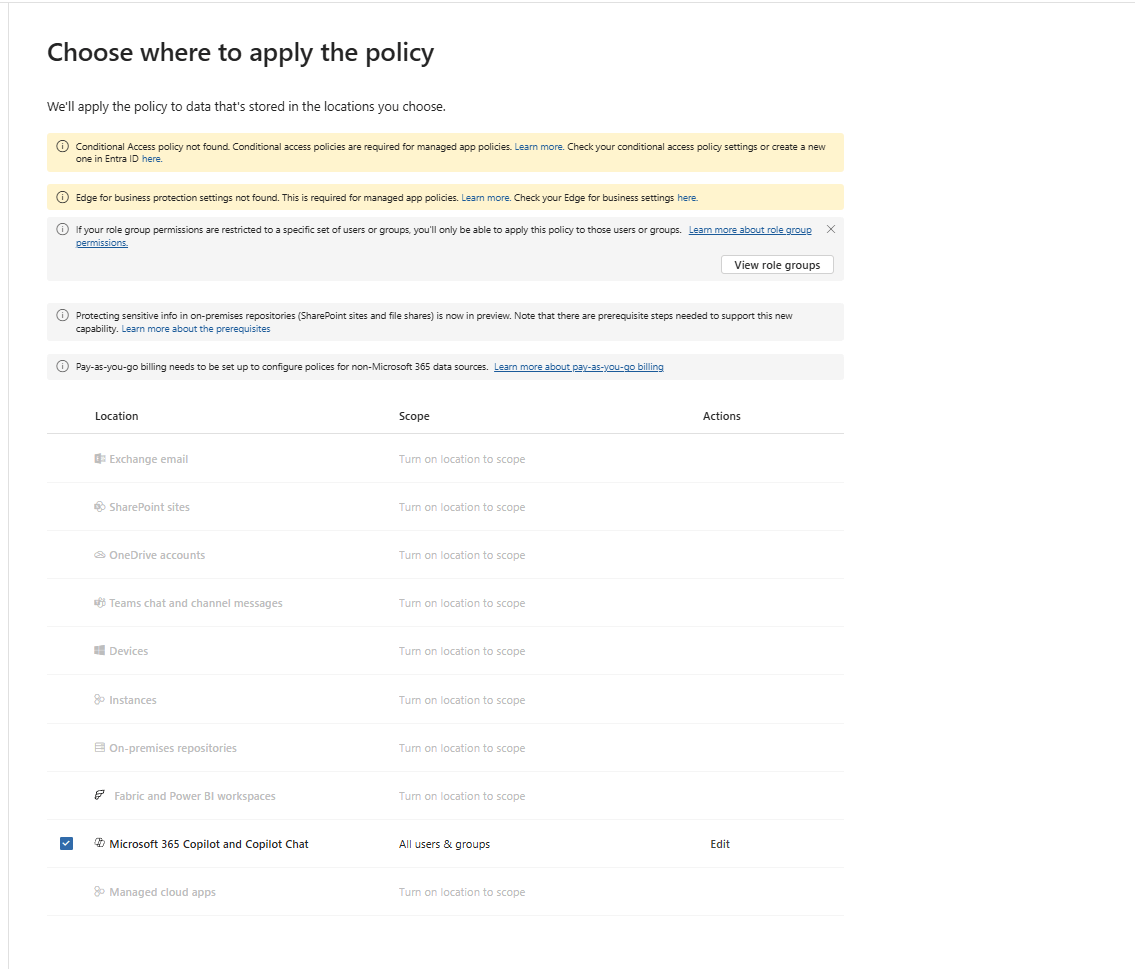
Once you scope the policy to Microsoft 365 Copilot and Copilot chat move to the next page to create a rule, here we will block processing based on a custom sensitive information type that we created.
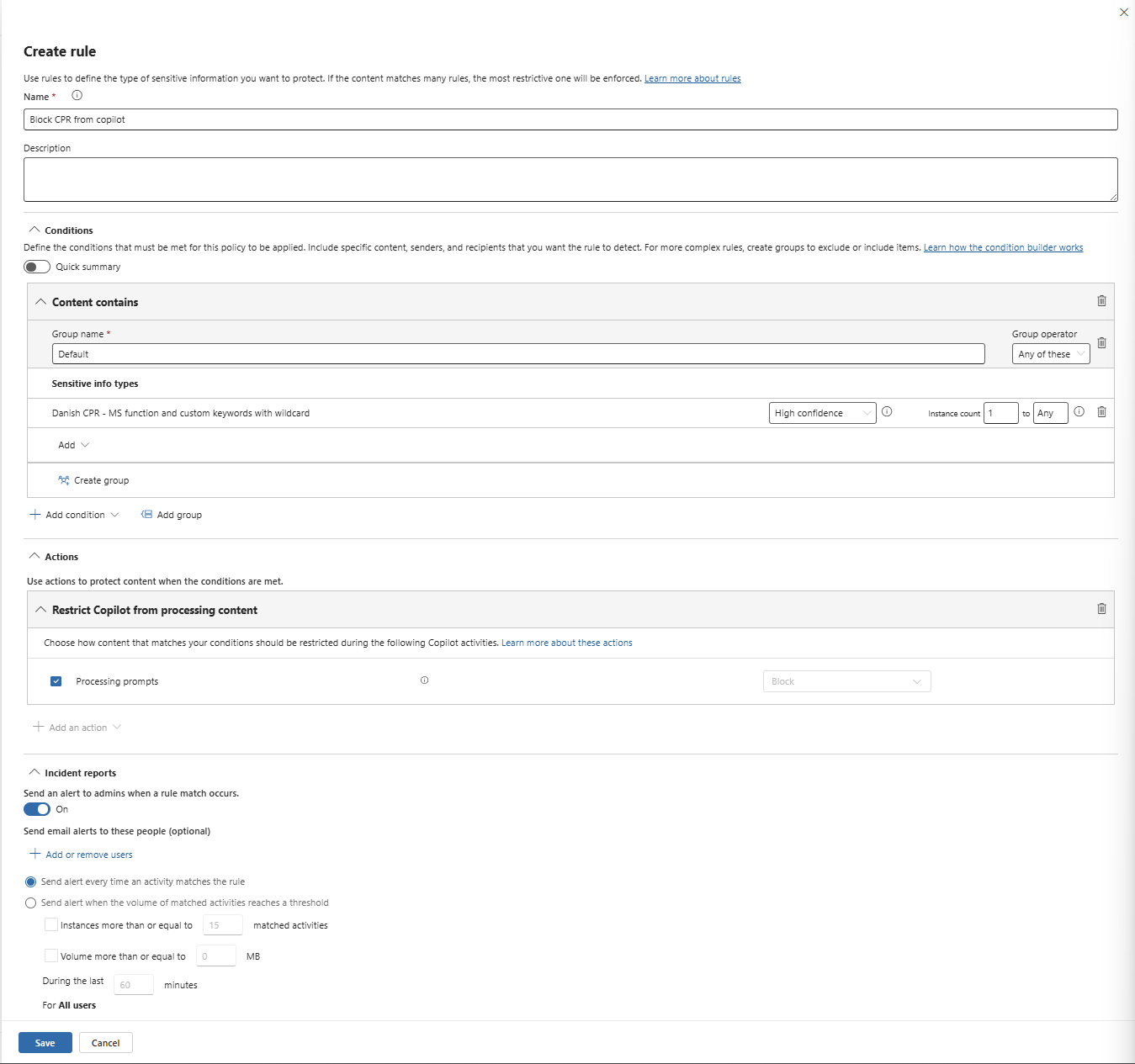
This is just one of the different things that we can do in purview to secure our data against AI.
3️⃣ Why you can’t deploy Copilot without fixing data governance first
This is the section most blog posts skip. It’s also the most important one.
Copilot honours your existing M365 permissions. That sounds reassuring until you realise what it means in practice: if a user has read access to a SharePoint site they shouldn’t, Copilot will happily find and surface content from it. It doesn’t just respect permissions — it amplifies existing permission sprawl by making discoverable what was previously buried.
Sensitivity labels are your enforcement layer. A DLP policy can prevent Copilot from returning responses that include content from labeled files. Without labels on your sensitive documents, there is no technical control to prevent Copilot from surfacing HR files, M&A documents, or board minutes to any licensed user who can technically access them.
Here’s the pre-deployment checklist I use with clients:
- Audit SharePoint and OneDrive permissions — Identify overshared sites, “everyone” links, and sites with broad external sharing. This is your exposure baseline.
- Classify and label sensitive data — Deploy Microsoft Purview sensitivity labels to at minimum: HR, Legal/Contracts, Finance, M&A/strategic content. Use auto-labeling policies where possible. [INTERNAL_LINK: sensitivity labels setup guide]
- Configure DLP policies for Copilot — Create Purview DLP policies that restrict Copilot from surfacing content with high-sensitivity labels.
- Enable DSPM for AI — Turn on Data Security Posture Management for AI in Microsoft Purview to get visibility into Copilot interactions, detect sensitive data in prompts and responses, and identify risky usage patterns. [INTERNAL_LINK: DSPM for AI setup and configuration]
- Enable Purview Audit logging — Ensure Copilot interaction logs are captured for compliance, eDiscovery, and incident response.
- Train users — Cover acceptable use, what Copilot can and cannot see, how to prompt effectively, and how to recognise hallucinations.
Deploy Copilot last — not first. Microsoft themselves provide a formal blueprint for oversharing with a phased prescriptive guide to audit and remediate permissions before deployment. The fact that Microsoft had to publish that document tells you how common the problem is.
4️⃣ What does Copilot for M365 cost, and what do the adoption numbers really say?
The licensing is straightforward but the budget impact is not:
- Enterprise: $30/user/month — requires M365 E3/E5 or Office 365 E3/E5 as a base. No minimum seats since January 2024.
- SMB (≤300 users): $21/user/month — the newer Copilot Business tier launched December 2025. This makes the conversation easier for smaller Danish firms already on M365 Business Premium.
To put the budget impact in perspective: Copilot adds 53% to your per-user costs if you’re on E5, and up to 500% if you’re on M365 Business Basic. That’s significant — especially if you’re licensing broadly rather than selectively.
What the adoption numbers tell us
After two years of heavy promotion, approximately 8 million users have Copilot licenses out of 440 million M365 subscribers — that’s 1.81%. In a 2024 CNBC survey, 50% of enterprise technology leaders couldn’t determine whether Copilot was worth $30/month after a full year of use.
Those numbers don’t mean Copilot is bad. They mean the value proposition is narrow. It works well for specific types of users, and most orgs are learning the hard way that licensing everyone isn’t the answer.
Watch out for autonomous agent costs
Fair warning: the new autonomous agents capability runs on Copilot Credits (pay-as-you-go, 25 credits per trigger). This isn’t included in your flat per-user fee and can scale unpredictably if agents are deployed without governance around trigger conditions. Budget accordingly.
5️⃣ Who actually gets ROI from Copilot — and who doesn’t?
The basic ROI math is simple: a $60,000/year employee (roughly $30/hour) needs to save just 1 hour per month to break even on the $30 license cost. Higher earners need even less time saved. The question isn’t whether the math works — it’s whether specific roles actually save that time.
High ROI roles — license these people first
- Senior knowledge workers — heavy email users, frequent meeting attendees, people who produce documents and presentations regularly. These users consistently report meaningful time savings.
- Managers — meeting summaries and email drafting address their two biggest time sinks.
- Consultants and advisors — document summarisation and rapid response drafting directly accelerate billable work.
- Analysts — Excel natural language queries on clean datasets speed up reporting cycles.
Low ROI roles — think twice before licensing
- Frontline workers — if they’re not in Outlook and Teams most of the day, the value isn’t there. If your team is mostly frontline workers, I’d think twice about broad licensing.
- Task-based roles — warehouse, retail, manufacturing. These roles don’t spend enough time in M365 apps to generate meaningful return.
- Roles with specialised tools — developers in VS Code, designers in Figma, engineers in CAD. Copilot for M365 doesn’t help them where they spend their time.
The smart play is selective licensing. Pick 10–20 users in high-ROI roles, run a 4–6 week pilot with defined success metrics, and let the data guide broader rollout. Don’t license the entire company on day one — that’s how you end up in the “50% of leaders can’t tell if it’s worth it” camp.
Is it worth it for your org?
Here’s the decision framework I walk clients through:
| Question | If yes | If no |
|---|---|---|
| Do your target users spend 4+ hours/day in M365 apps? | Strong candidate ✅ | Weak ROI case ⚠️ |
| Are your SharePoint permissions clean and audited? | Safe to proceed ✅ | Fix this first — non-negotiable 🛑 |
| Do you have sensitivity labels on sensitive content? | Good governance foundation ✅ | Deploy labels before Copilot 🛑 |
| Do target users attend 10+ meetings/week? | Teams summaries = high value ✅ | One less reason to buy ⚠️ |
| Is $30/user/month material to your IT budget? | Start with selective licensing | Pilot broadly, cut what doesn’t work |
| Have you already tried ChatGPT for general tasks? | Compare outputs honestly | Try it first — it might be enough |
My honest take: Copilot for M365 is a good product for a narrow audience. If you’re a 50-person consulting firm where everyone lives in Outlook and Teams, it’s probably worth it for your senior staff. If you’re a 200-person manufacturing company where 150 people work on the floor, you’re looking at maybe 20 licenses — not 200. And if you haven’t done the data governance groundwork, don’t deploy it yet. Full stop.
The right sequence is always: data governance → pilot → selective rollout. Not the other way around.
FAQ
Does Microsoft Copilot train on my organisation’s data?
No. Microsoft Copilot for M365 does not train on your org data. Prompts and responses are protected by the same contractual terms as Exchange and SharePoint data. Your data stays within your tenant boundary.
Can I use Copilot for M365 without an E5 license?
Yes. Copilot works on M365 E3, E5, Office 365 E3, E5, and M365 Business Standard/Premium plans. There’s no minimum seat requirement since January 2024. The SMB tier at $21/user/month is available for organisations with 300 users or fewer.
Is Microsoft Copilot better than ChatGPT for business?
It depends on the use case. Copilot wins on tenant data integration, compliance audit trails, and sensitivity label awareness. ChatGPT often produces better creative output and costs less. If your data governance isn’t mature, ChatGPT may actually be the safer starting point because it doesn’t automatically access your organisation’s files.
What do I need to set up before deploying Copilot?
At minimum: audit and remediate SharePoint permissions, deploy sensitivity labels on sensitive content, configure DLP policies for the Copilot location, enable DSPM for AI in Microsoft Purview, and enable audit logging. Microsoft’s own oversharing blueprint walks through this.
How many organisations have actually adopted Copilot for M365?
As of mid-2025, approximately 8 million users out of 440 million M365 subscribers have Copilot licenses — about 1.81%. In a CNBC survey, 50% of enterprise technology leaders couldn’t determine if Copilot was worth $30/month after one year of use. Adoption has been slower than Microsoft projected.
What are Copilot Credits and do they cost extra?
Yes. Autonomous agents in Copilot run on Copilot Credits (pay-as-you-go, 25 credits per trigger). This is separate from the flat per-user license fee and can scale unpredictably. Set governance around trigger conditions before enabling agents.