
🔐 Microsoft’s Zero Trust Approach – The Strategic Foundation for Modern Security
Author: Niels Jakobsen, Senior Microsoft Security and Modern workplace Consultant
Date : 22/7 – 25
🧭 What Is Zero Trust?
Zero Trust is more than a buzzword—it’s a fundamental shift in how we think about security. The traditional perimeter-based model is no longer sufficient in a world of remote work, cloud services, and increasingly sophisticated threats.
“Zero Trust is a security strategy. Instead of assuming everything behind the corporate firewall is safe, the Zero Trust model assumes every request is a potential breach.” – Microsoft
Microsoft’s Zero Trust architecture is built around three core principles:
- Verify explicitly – Always authenticate and authorize based on all available data points.
- Use least privileged access – Limit access with just-in-time (JIT) and just-enough-access (JEA) principles.
- Assume breach – Minimize blast radius and segment access, and continuously monitor.
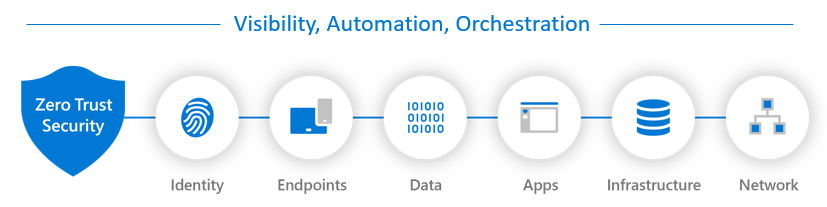
🏗️ Microsoft’s Zero Trust Pillars
Microsoft maps its Zero Trust strategy across six technology pillars, and I have tried mapping the relevant tools that you can use to secure each of the six pillars.

🔍 Real-World Zero Trust Scenarios
Let’s look at a few practical examples:
✅ Conditional Access + Identity Protection
A user logs in from an unmanaged device in a risky location. Conditional Access blocks access unless the device is compliant and MFA is passed. Identity Protection flags the login as risky and can trigger remediation workflows.
🛡️ Defender for Endpoint + Intune
A device shows signs of compromise. Defender for Endpoint isolates the device, and Intune revokes access to corporate resources until the device is remediated.
🔐 Microsoft Purview + DLP
Sensitive data is detected in an email. DLP policies prevent it from being sent externally, and Purview logs the incident for compliance review.
🧠 Strategy Before Tools
Zero Trust isn’t just about deploying Microsoft tools—it’s about designing a strategy that aligns with your organization’s risk posture, business needs, and operational maturity.
Start by asking:
- What identities pose the greatest risk?
- Which devices are unmanaged or vulnerable?
- Where is your sensitive data stored and accessed?
- What apps are critical to business operations?
- How is your infrastructure segmented and monitored?
Resources
Zero Trust Assessment Tool
Zero Trust Assessment Tool | Microsoft Zero Trust Workshop
Microsoft has released a Zero Trust Assessment Tool, what you do is you run this assessment from powershell, and it will create a Excel file with your current state. It can help provide actionable insights, a roadmap and more in your Zero Trust journey.
Zero Trust Deployment Plan
Zero Trust deployment plan with Microsoft 365 | Microsoft Learn
This Article will help you understand more in depth, how to make a plan for implementing Zero Trust. It will link to a lot of other articles.
Rapid Modernisation Plan (RaMP)
RaMP Checklist—Explicitly validate trust for all access requests | Microsoft Learn
This might be the place to start if you are just beginning your Microsoft Zero Trust journey. It covers a quick way to atleast get somewhat secure, before you start implementing zero trust in a broad Context.
🚀 What’s Next?
In the coming weeks, we’ll dive deeper into each pillar—starting with Identity and Conditional access. Conditional access is at the center of Microsoft Zero Trust Strategy, and has connections to all of the different pillars. If you want to start securing your Microsoft envoirnment, or if you just want to take it to the next level, a proper conditional access framework is the next step.
If you’re building or refining your Zero Trust strategy, stay tuned. And feel free to reach out or comment with your own experiences—let’s learn together.
Thanks for reading, and see you next week!
Niels Jakobsen